

Components
React components for swaps, checkout, deposits, NFTs, and custom contract calls
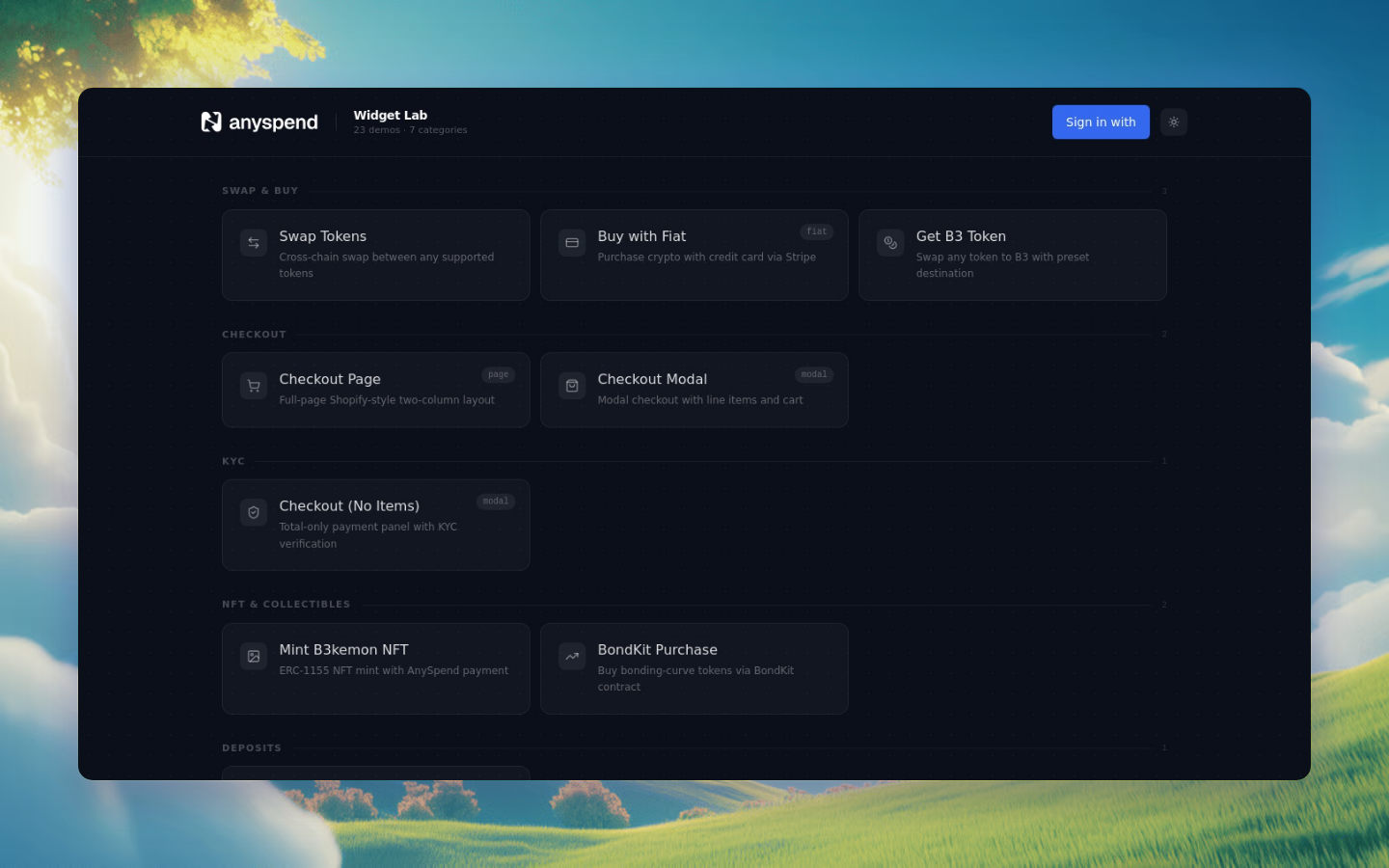
All the React components you can drop into your app. Each one handles a different payment pattern. Try them interactively in the SDK demo.
Core components
<AnySpend>
The primary interface component for token-to-token exchanges, fiat onramps, and cross-chain swaps.
tsximport { AnySpend } from "@b3dotfun/sdk/anyspend/react";<AnySpend mode="modal" defaultActiveTab="crypto" destinationTokenAddress="0x..." destinationTokenChainId={8453} recipientAddress="0x..."/>;
Props
Display as modal overlay or full page
Initial payment method tab
Target token contract address
Chain ID of destination token
Recipient wallet address
Pre-select the source chain
Load and display an existing order by ID
Hide the transaction history button
Hide the component header
Hide the bottom navigation bar
Called when a token is selected. Call event.preventDefault() to prevent default token selection behavior.
Callback fired on successful transaction
Custom fiat input presets (e.g., ["10", "25", "50", "100"])
Disable URL parameter syncing for swap configuration
Enable direct transfers when source and destination token/chain match (skips the swap backend)
Fixed destination amount in wei. When set, users cannot change the amount.
Pre-fill sender address to show token balances before wallet connection
Opaque metadata passed through to order callbacks (e.g., workflow form data)
URL to redirect to from the "Return to Home" button on the completion screen
Custom label for the recipient display (e.g., "OBSN Telegram Bot")
Custom label for the return home button
CSS class overrides for specific elements. See Customization.
Render function overrides for replaceable UI elements. See Customization.
Text/message overrides for success, error, and processing states. See Customization.
Color and theme configuration. See Customization.
Usage examples
tsx<AnySpend mode="page" recipientAddress={userWalletAddress} onSuccess={(txHash) => console.log("Completed:", txHash)}/>
tsx<AnySpend defaultActiveTab="fiat" destinationTokenAddress="0x833589fCD6eDb6E08f4c7C32D4f71b54bdA02913" destinationTokenChainId={8453} recipientAddress={userWalletAddress}/>
tsx<AnySpend mode="modal" destinationTokenAddress="0x833589fCD6eDb6E08f4c7C32D4f71b54bdA02913" destinationTokenChainId={8453} destinationTokenAmount="10000000" // 10 USDC recipientAddress={merchantAddress} allowDirectTransfer/>
tsx<AnySpend mode="page" recipientAddress={userAddress} theme={{ brandColor: "#6366f1" }} content={{ successTitle: "Payment Received!", successDescription: "Your order is being processed.", }} slots={{ footer: <PoweredByYourBrand />, }}/>
<AnySpendDeposit>
A streamlined deposit interface supporting chain selection, crypto/fiat payments, and custom contract deposits.
tsximport { AnySpendDeposit } from "@b3dotfun/sdk/anyspend/react";<AnySpendDeposit recipientAddress="0x..." destinationTokenAddress="0x833589fCD6eDb6E08f4c7C32D4f71b54bdA02913" destinationTokenChainId={8453} onSuccess={(amount) => console.log("Deposited:", amount)}/>;
Props
The wallet address to receive the deposit
Destination token contract address
Destination chain ID
Display mode
Force a payment type. If not set, shows chain selection first.
Pre-select the source token
Pre-select the source chain. If not provided, shows chain selection step.
Load an existing order by ID
Callback when deposit completes successfully
Callback when the close button is clicked
Called on token selection. Call event.preventDefault() to override default behavior.
Callback for opening a custom modal (e.g., for special token handling)
Order type for the deposit
Configuration for depositing to a custom smart contract. Creates a custom_exact_in order that calls the specified contract.
Allow direct transfers when source and destination match
Fixed destination amount in wei
Minimum destination amount required
Prefer using connected EOA wallet
Show chain selection step. Defaults to true if sourceTokenChainId is not provided.
Custom list of supported chains for chain selection
Number of top chains to show in chain selection
Custom title for the chain selection step
Custom description for the chain selection step
Custom fiat input presets
Custom label for the action button
Custom header component
Custom footer content
Redirect URL for the "Return to Home" button
Custom label for recipient display
Custom label for the return button
Pre-fill sender address for token balance display
Metadata passed through to order callbacks
When true, uses AnySpendCustomExactIn for custom function deposits
CSS class overrides. See Customization.
Render function overrides. See Customization.
Text/message overrides. See Customization.
Theme configuration. See Customization.
DepositContractConfig
Use this to configure custom contract deposits:
typescriptinterface DepositContractConfig { /** Custom function ABI JSON string */ functionAbi: string; /** The function name to call */ functionName: string; /** Arguments for the function. Use "{{amount_out}}" as a placeholder for the deposit amount */ functionArgs: string[]; /** Contract address to deposit to */ to: string; /** Optional spender address if different from contract */ spenderAddress?: string; /** Custom action label (e.g., "Stake", "Deposit") */ action?: string;}
ChainConfig
typescriptinterface ChainConfig { id: number; // Chain ID name: string; // Display name iconUrl?: string; // Optional icon URL}
Usage examples
tsx<AnySpendDeposit recipientAddress={walletAddress} destinationTokenAddress="0x833589fCD6eDb6E08f4c7C32D4f71b54bdA02913" destinationTokenChainId={8453} onSuccess={(amount) => toast.success(`Deposited ${amount}`)}/>
tsx<AnySpendDeposit recipientAddress={contractAddress} destinationTokenAddress="0x833589fCD6eDb6E08f4c7C32D4f71b54bdA02913" destinationTokenChainId={8453} depositContractConfig={{ functionAbi: JSON.stringify(stakingAbi), functionName: "stake", functionArgs: ["{{amount_out}}", "30"], to: "0xStakingContract...", action: "Stake", }} isCustomDeposit onSuccess={(amount) => toast.success("Staked!")}/>
tsx<AnySpendDeposit recipientAddress={walletAddress} destinationTokenAddress="0x833589fCD6eDb6E08f4c7C32D4f71b54bdA02913" destinationTokenChainId={8453} showChainSelection supportedChains={[ { id: 8453, name: "Base" }, { id: 1, name: "Ethereum" }, { id: 42161, name: "Arbitrum" }, ]} chainSelectionTitle="Where are your funds?" chainSelectionDescription="Select the chain you want to deposit from"/>
<AnySpendCheckout>
A full-featured checkout component with cart display, order summary, custom forms, shipping selection, discount codes, and multi-payment-method support.
tsximport { AnySpendCheckout } from "@b3dotfun/sdk/anyspend/react";<AnySpendCheckout recipientAddress="0x..." destinationTokenAddress="0x833589fCD6eDb6E08f4c7C32D4f71b54bdA02913" destinationTokenChainId={8453} items={[ { name: "Pro Plan", amount: "10000000", quantity: 1 }, ]} organizationName="Acme Inc" onSuccess={(result) => console.log("Paid:", result)}/>;
For full checkout documentation, see the Checkout Guide.
Props
Payment recipient wallet address
Destination token contract address
Destination chain ID
Line items to display in the cart
Display mode
Override the computed total (in wei). Useful when the total differs from the sum of item amounts.
Merchant/organization name displayed in the checkout header
URL for the organization logo
Hex color for theming the checkout (e.g., "#6366f1")
Custom text for the payment button
Link this checkout to a checkout session for backend tracking
Called on successful payment
Called on payment error
URL to redirect to after payment
Label for the return button
Which payment method to expand initially
Pre-fill sender address for token balance display
Custom footer for the order summary. Pass null to hide the default footer.
Show points earned in the order status summary
Show the order ID in the order status summary
Shipping cost. String = amount in wei. Object = amount with custom label.
Tax amount. String = amount in wei. Object = amount with custom label and optional rate display.
Discount amount (displayed as negative). String = amount in wei. Object = amount with label and optional code.
Additional summary line items (e.g., platform fees, tips, service charges)
JSON schema for collecting customer info. See Checkout Guide.
Custom React form component. See Checkout Guide.
Called when form data changes
Shipping options displayed as a selector. See Checkout Guide.
Show a shipping address form
Called when shipping option changes
Show a discount code input
Async discount code validation function
Called when a discount is applied
CSS class overrides. See Customization.
Render function overrides. See Customization.
Text/message overrides. See Customization.
Theme configuration. See Customization.
CheckoutItem
typescriptinterface CheckoutItem { id?: string; name: string; description?: string; imageUrl?: string; /** Amount in wei (smallest unit of destination token) */ amount: string; quantity: number; /** Custom metadata displayed as label: value pairs */ metadata?: Record<string, string>;}
CheckoutSummaryLine
typescriptinterface CheckoutSummaryLine { /** Display label (e.g., "Platform Fee", "Service Charge") */ label: string; /** Amount in token's smallest unit (wei). Negative values shown as deductions. */ amount: string; /** Optional description or note */ description?: string;}
<AnySpendCheckoutTrigger>
Extends AnySpendCheckout with B3 workflow integration. Automatically triggers a workflow on successful payment.
tsximport { AnySpendCheckoutTrigger } from "@b3dotfun/sdk/anyspend/react";<AnySpendCheckoutTrigger recipientAddress="0x..." destinationTokenAddress="0x833589fCD6eDb6E08f4c7C32D4f71b54bdA02913" destinationTokenChainId={8453} items={[{ name: "API Credits", amount: "5000000", quantity: 1 }]} workflowId="wf_abc123" orgId="org_xyz" onSuccess={(result) => console.log("Payment & workflow triggered:", result)}/>;
Additional Props (beyond AnySpendCheckout)
B3 workflow ID to trigger on successful payment
Organization ID that owns the workflow
Metadata merged into the order for workflow access. The inputs field is accessible via {{root.result.inputs.*}} in workflows.
tsx<AnySpendCheckoutTrigger recipientAddress="0x..." destinationTokenAddress="0x833589fCD6eDb6E08f4c7C32D4f71b54bdA02913" destinationTokenChainId={8453} items={[{ name: "Pro Plan - Monthly", amount: "10000000", quantity: 1 }]} workflowId="wf_provision_subscription" orgId="org_acme" callbackMetadata={{ inputs: { plan: "pro", userId: "user_123", email: "user@example.com", }, }} onSuccess={(result) => { console.log("Subscription activated:", result); }}/>
<AnySpendWorkflowTrigger>
A payment component designed specifically for triggering B3 workflows. Requires a fixed payment amount and workflow configuration.
tsximport { AnySpendWorkflowTrigger } from "@b3dotfun/sdk/anyspend/react";<AnySpendWorkflowTrigger recipientAddress="0x..." chainId={8453} tokenAddress="0x833589fCD6eDb6E08f4c7C32D4f71b54bdA02913" amount="5000000" workflowId="wf_abc123" orgId="org_xyz" onSuccess={(amount) => console.log("Workflow triggered with:", amount)}/>;
Props
Payment recipient address
Destination chain ID
Destination token address
Required payment amount in wei
B3 workflow ID to trigger
Organization ID that owns the workflow
Metadata for workflow access. inputs are accessible via {{root.result.inputs.*}}.
Callback when payment succeeds
Callback when the component is closed
Display mode
Custom label for the action button (e.g., "Pay & Activate")
CSS class overrides
<QRDeposit>
A QR code-based deposit interface that generates a deposit address for users to send funds to.
tsximport { QRDeposit } from "@b3dotfun/sdk/anyspend/react";<QRDeposit recipientAddress="0x..." destinationToken={usdcToken} destinationChainId={8453} onSuccess={(txHash) => console.log("Deposit received:", txHash)}/>;
Props
The wallet address to receive the deposit
The destination token to receive
The destination chain ID
Display mode
Source token to deposit (defaults to ETH on Base)
Source chain ID (defaults to Base)
Creator address for order tracking
Custom contract execution after deposit
Callback when back button is clicked
Callback when close button is clicked
Callback when the deposit order is created
Callback when deposit is completed
CSS class overrides
Specialized components
<AnySpendNFTButton>
A streamlined button for NFT purchases with built-in payment handling.
tsximport { AnySpendNFTButton } from "@b3dotfun/sdk/anyspend/react";<AnySpendNFTButton nftContract={nftContractDetails} recipientAddress="0x..." />;
Props
NFT contract configuration object
Wallet address to receive the NFT
NFTContract Interface
typescriptinterface NFTContract { chainId: number; contractAddress: string; price: string; // Price in wei priceFormatted: string; // Human-readable price currency: { chainId: number; address: string; // 0x0 for native ETH name: string; symbol: string; decimals: number; metadata: { logoURI: string }; }; name: string; description: string; imageUrl: string; tokenId: number | null; // null for ERC721 type: "erc721" | "erc1155";}
<AnySpendCustom>
Flexible component for custom smart contract interactions, including staking, gaming, and DeFi operations.
tsximport { AnySpendCustom } from "@b3dotfun/sdk/anyspend/react";<AnySpendCustom orderType="custom" dstChainId={8453} dstToken={tokenDetails} dstAmount="1000000000000000000" contractAddress="0x..." encodedData="0x..." onSuccess={(txHash) => console.log("Done:", txHash)}/>;
Props
Order type identifier
Target blockchain network
Token used for payment
Amount in wei
Target smart contract address
Encoded function call data
Token spender address
Custom metadata for tracking
Custom header component
Success callback
<AnySpendNFT>
Enhanced NFT purchase component with marketplace features.
tsx<AnySpendNFT nftContract={nftDetails} recipientAddress="0x..." />
<AnySpendStakeB3>
Pre-configured component for B3 token staking.
tsx<AnySpendStakeB3 recipientAddress="0x..." />
<AnySpendBuySpin>
Gaming-specific component for purchasing spin wheel or lottery entries.
tsx<AnySpendBuySpin recipientAddress="0x..." />
<AnySpendTournament>
Tournament entry payment component.
tsx<AnySpendTournament recipientAddress="0x..." />
<AnySpendBondKit>
BondKit integration for bonding curve token purchases.
tsx<AnySpendBondKit recipientAddress="0x..." />
Providers
<AnyspendProvider>
Required provider that wraps all AnySpend components. Manages query client, Stripe redirect handling, and feature flags.
tsximport { AnyspendProvider } from "@b3dotfun/sdk/anyspend/react";import { B3Provider } from "@b3dotfun/sdk/global-account/react";import "@b3dotfun/sdk/index.css";function App() { return ( <B3Provider theme="light" environment="production" partnerId="your-partner-id"> <AnyspendProvider> {/* Your app components */} </AnyspendProvider> </B3Provider> );}
Props
Child components
Optional feature flag overrides
Payment method types
typescript// Crypto payment methodsenum CryptoPaymentMethodType { NONE = "NONE", CONNECT_WALLET = "CONNECT_WALLET", // External EOA wallet (MetaMask, etc.) GLOBAL_WALLET = "GLOBAL_WALLET", // B3 smart wallet TRANSFER_CRYPTO = "TRANSFER_CRYPTO", // Direct crypto transfer}// Fiat payment methodsenum FiatPaymentMethod { NONE = "NONE", COINBASE_PAY = "COINBASE_PAY", // Coinbase onramp STRIPE = "STRIPE", // Stripe redirect flow STRIPE_WEB2 = "STRIPE_WEB2", // Stripe embedded form}